Case study · 06
Self-hosted homelab
A private, fully monitored homelab of five machines, running the services I depend on.
- Role
- Personal project
- Status
- Running
- Read
- 3 min
- Stack
- DockerPrometheusGrafanaUptime Kuman8nCouchDBHome AssistantRaspberry Pi
5
machines watched on a private mesh VPN
Problem
I wanted my automations, notes sync and smart home on hardware I control, with enough monitoring to trust it.
Approach
- 01A rack-mounted NAS with two mirrored 4 TB drives hosts the notes-sync database and the monitoring stack.
- 02A Raspberry Pi 5 runs n8n workflows in Docker. A second Pi 5 runs Home Assistant with Matter devices, and a Pi 4 drives a kiosk dashboard. The NAS also serves my media library.
- 03An always-on Mac in the rack runs Hermes and the agent stack, with sleep disabled so it keeps serving with the lid closed. Its memory pressure and temperature are scraped like any other host.
- 04Prometheus scrapes all five machines, the laptop included, every 15 seconds. Custom metrics track notes-sync age and the hours since each scheduled workflow last ran, and Grafana and Uptime Kuma show fleet health.
- 05Watchdogs alert after 2 consecutive bad checks and once on recovery. A stale-workflow detector flags any schedule silent for more than twice its interval, and a dead-man heartbeat watches the watchers.
- 06Every alert has one path: the watchdogs tell Hermes, which texts me, and the Pi texts me directly if the laptop can't. The laptop and the Pi watch each other, so one of them going down still raises an alert. Uptime Kuma shows the board but sends nothing.
- 07Access is over a private mesh VPN. Notes sync is end-to-end encrypted across four devices.
- 08The native Hermes app I built runs it day to day, with a Homelab tab for hosts, services, n8n runs, the smart home and the 3D printer (status, camera, pause and stop; starting a print always needs my approval).
Monitor application health, not just reachability.
Architecture
What's inside
Devices05
- NAS
- Always-on storage on a mirrored pair of drives, and the Docker host for infrastructure.
- n8n Pi
- A Raspberry Pi 5 that runs the automations and the watchdogs.
- HA Pi
- A Raspberry Pi 5 dedicated to the smart home.
- Dashboard Pi
- A Raspberry Pi 4 driving a rack touchscreen.
- Laptop
- The docked laptop at home: main copy of the notes, and where Hermes and my apps run.
Core services07
- Private mesh VPN
- One private network that every device joins.
- Encrypted notes sync
- A self-hosted sync database that is the single source of truth for the vault.
- Headless Obsidian
- Obsidian running without a screen on the n8n Pi, with a local API.
- n8n
- The workflow engine behind the automations.
- Prometheus + Grafana
- Metrics from every machine every 15 seconds, and the dashboards on top.
- Uptime Kuma
- An up/down board for every service.
- Home Assistant
- The smart-home hub.
Custom apps I built04
- Watchdogs
- Scripts on the n8n Pi that decide something is wrong and tell me.
- Dead-man check
- The check that watches the watchers, from the laptop.
- Homelab OS
- The homelab console, a tab in the Hermes app on phone and iPad.
- Design Inbox processor
- Turns links I share from the phone into summarised entries in my design hub.
n8n workflows04
- Todoist ↔ notes task sync
- Keeps Todoist and the task lists in my notes in step, every 6 hours.
- Vault maintenance
- A daily pass that links related notes and runs a health check on the vault.
- Smart email sorter
- An hourly workflow that sorts incoming email.
- Design inbox capture
- The webhook behind the phone's share-sheet shortcut.
Phone apps
The app I built to run it from my phone
Hermes is a native iPhone and iPad app, and the homelab console lives inside it as a tab. It reaches only my private network, refuses any login but mine, and the n8n Pi checks the servers behind it every 5 minutes and texts me if one stops answering.
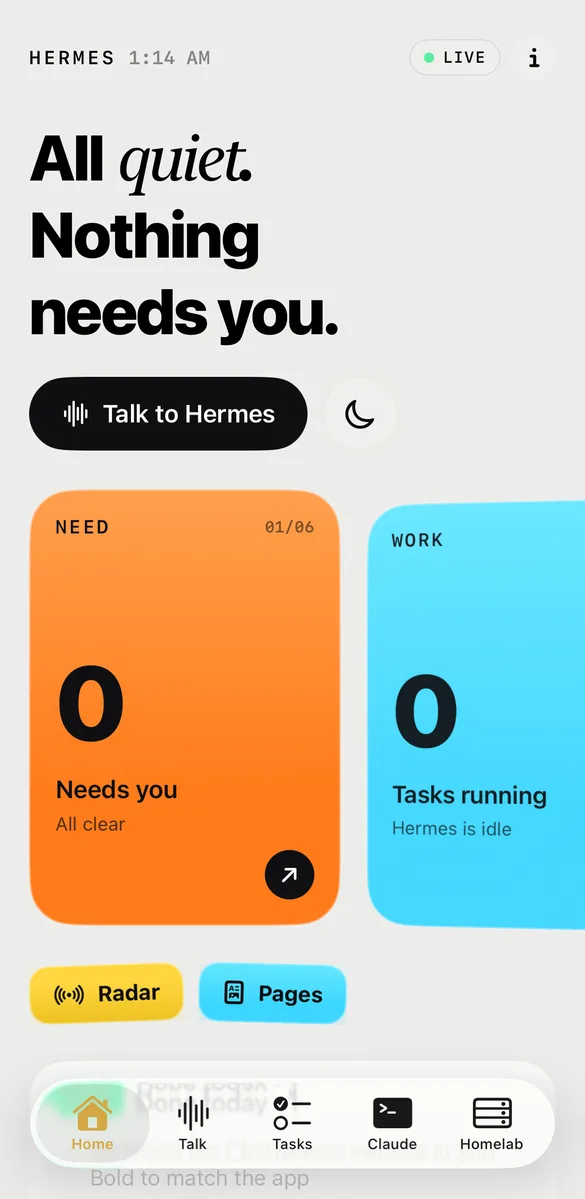
A native SwiftUI app for everything Hermes: its asks, my to-do board, every Claude Code session, its pages and the homelab.
- When Hermes needs a decision it sends a push with Approve, Deny, Merge or Retry right on the notification, behind Face ID. Home and Lock Screen widgets, Control Center controls and a Live Activity show what it is working on.
- Talk to it by voice (hold, or hands-free with interrupt) or by typing; the Tasks board, where each task opens with its report, screenshots and a plan shown as a checklist with progress; and the live board of every Claude Code session with context, cost and limits.
- Every page it writes opens in an in-app reader. It started as four web apps; they were merged into one and then rebuilt as a native app shipped through TestFlight by Xcode Cloud, with the old web servers kept only as its backend.
Safety: Only my login on the private network. Buttons take the same guarded paths as my texts, a second tap on something already running is refused, and the command launcher only types allow-listed commands into an existing session after a confirm step.
How it all connects
The homelab and Hermes are one system. Pick a part to see what it talks to, or trace a flow end to end.
- custom apps
- 9
- n8n workflows
- 4
- commands
- 10
- parts
- 43
- connections
- 78
01Devices6
Laptop
The docked laptop at home: main copy of the notes, and where Hermes and my apps run.
- Runs Hermes, Claude Code, the phone dashboards and the design processor as background services.
- Publishes its own metrics, so it is watched like every other node.
- macOS
- launchd
- Node
- tmux
- Ollama
Connects to
- Private mesh VPN · joins
- Hermes · runs
- Dead-man check · runs every 3 minutes
- Notes vault · keeps the main copy
- Design Inbox processor · runs every 10 minutes
- Hermes app · hosts
- Homelab OS · hosts
- Watchdogs · alerts over the home network
- Self-hosted CI · hosts
NAS
Always-on storage on a mirrored pair of drives, and the Docker host for infrastructure.
- Hosts the notes-sync database and the monitoring stack, so they outlive any one laptop.
- Mirrored drives: one disk can fail without losing the notes.
- RAID 1
- Docker
Connects to
- Private mesh VPN · joins
- Encrypted notes sync · hosts
- Prometheus + Grafana · hosts
- Uptime Kuma · hosts
n8n Pi
A Raspberry Pi 5 that runs the automations and the watchdogs.
- Keeps its own copy of the notes with a headless Obsidian, so workflows can edit notes while the laptop sleeps.
- Runs the watchdog scripts, deliberately on a different machine from the one they alert through.
- Raspberry Pi 5
- Docker
- cron
Connects to
- Private mesh VPN · joins
- n8n · runs
- Headless Obsidian · runs
- Watchdogs · runs every 5 minutes
- Vault maintenance · runs link and health scripts
HA Pi
A Raspberry Pi 5 dedicated to the smart home.
- Isolates Home Assistant so automations and the house never share a failure.
- Matter devices on their own node.
- Raspberry Pi 5
- Home Assistant OS
Connects to
- Home Assistant · runs
Dashboard Pi
A Raspberry Pi 4 driving a rack touchscreen.
- A kiosk that shows fleet health at a glance, no laptop needed.
- Boots straight into the dashboards.
- Raspberry Pi 4
- Chromium kiosk
Connects to
- Prometheus + Grafana · shows the dashboards
Phone & iPad
Where I run Hermes, check the homelab and capture ideas.
- The native Hermes app, with its homelab tab, widgets and approval notifications.
- Notes stay in sync here too, end to end encrypted.
- Hermes app
- Shortcuts
- Obsidian
Connects to
- Private mesh VPN · joins
- Managed iMessage line · texts Hermes; critical alerts land here
- Hermes app · native app
- Homelab OS · tab in the Hermes app
- Encrypted notes sync · LiveSync on every device
- Design inbox capture · share sheet
02Core services14
Private mesh VPN
One private network that every device joins.
- Nothing is exposed to the public internet; the apps are reachable only inside it.
- Gives the phone apps and the notes database trusted HTTPS.
- Tailscale
Connects to
- Laptop · joins
- NAS · joins
- n8n Pi · joins
- Phone & iPad · joins
Managed iMessage line
Hermes' backup channel, for critical alerts and when the app can't deliver.
- Replaced a self-bridged gateway that could see every conversation.
- Carries only critical alerts and Hermes' replies when I text it; everything else goes to the app.
- iMessage
Connects to
- Phone & iPad · texts Hermes; critical alerts land here
- Hermes · texts in; critical alerts out
- Watchdogs · fallback: sends direct, tagged via Pi
Model chain
The models Hermes reasons with, in fallback order.
- Claude Sonnet first, a smaller Claude model for background jobs, then Gemini, then a local model as the offline last resort.
- The local model is last because it failed a real tool-calling test.
- Claude
- Gemini
- Ollama
Connects to
- Hermes · reasons with, in fallback order
Self-hosted CI
GitHub Actions runners on the laptop, so every check runs on my own hardware.
- iOS builds and UI tests on a native macOS runner.
- Everything else in an isolated Docker Linux runner, with no hosted minutes.
- A red build goes to Hermes, which reproduces it and opens a fix.
- GitHub Actions
- Docker
- Xcode
Connects to
- Laptop · hosts
- Task desk · red builds become fix plans
Memory server
Hermes's long-term memory, running locally.
- Recalls before each turn and stores after it.
- Stays on my hardware.
- Hindsight
Connects to
- Hermes · recalls and stores
Claude Code
The worker that does the actual coding.
- Runs headless for Hermes jobs, or in a terminal I can watch from the phone.
- Also does the read-only summarising for the design processor.
- Claude Code
- tmux
Connects to
- Claude delegate + relay · starts a background job
- Hermes app · live session board
- Design Inbox processor · summarises with read-only tools
Notes vault
My notes: the knowledge base the agents read and the workflows write.
- One vault shared by me, Hermes, n8n and the design processor.
- Each automated note has exactly one writer, so sync conflicts can't happen.
- Obsidian
- Markdown
Connects to
- Laptop · keeps the main copy
- Encrypted notes sync · LiveSync, end to end encrypted
- /done · writes the session log
- /process-inbox · files the inbox
- Design Inbox processor · writes the design hub
- /design-review · triages the design hub monthly
Encrypted notes sync
A self-hosted sync database that is the single source of truth for the vault.
- Devices sync to the database, never to each other.
- End to end encrypted; replaced a consumer cloud drive.
- CouchDB
- Self-hosted LiveSync
Connects to
- NAS · hosts
- Notes vault · LiveSync, end to end encrypted
- Headless Obsidian · Pi's copy syncs every 5 minutes
- Phone & iPad · LiveSync on every device
Headless Obsidian
Obsidian running without a screen on the n8n Pi, with a local API.
- Lets n8n edit notes the same way I would.
- A launcher restarts it within minutes if it stops.
- Obsidian
- Local REST API
Connects to
- n8n Pi · runs
- Encrypted notes sync · Pi's copy syncs every 5 minutes
- Todoist ↔ notes task sync · edits the task notes
- Design inbox capture · appends to raw captures
- Design Inbox processor · reads raw captures from the Pi
n8n
The workflow engine behind the automations.
- Runs in Docker on its own Pi.
- Every scheduled workflow is watched for going quiet.
- n8n
- Docker
Connects to
- n8n Pi · runs
- Watchdogs · checks health and quiet schedules
- Homelab OS · drills into runs
- Todoist ↔ notes task sync · runs every 6 hours
- Vault maintenance · runs daily
- Smart email sorter · runs hourly
- Design inbox capture · runs on each share
Prometheus + Grafana
Metrics from every machine every 15 seconds, and the dashboards on top.
- Custom metrics for notes-sync age and how long since each workflow last ran.
- Dashboards provisioned from files, so an update can't wipe them.
- Prometheus
- Grafana
- node_exporter
Connects to
- NAS · hosts
- Dashboard Pi · shows the dashboards
- Watchdogs · writes custom metrics
- Dead-man check · asks: is everything up?
- Homelab OS · reads host metrics
Uptime Kuma
An up/down board for every service.
- Deliberately sends no notifications: alerts have one path, through Hermes.
- The watchdogs push heartbeats to it.
- Uptime Kuma
Connects to
- NAS · hosts
- Watchdogs · pushes heartbeats
Home Assistant
The smart-home hub.
- Controllable from Homelab OS on the phone.
- Matter devices on a dedicated node.
- Home Assistant
- Matter
Connects to
- HA Pi · runs
- Homelab OS · controls
Todoist
Where I capture tasks on the go.
- Kept in step with the task lists in my notes by an n8n workflow.
- Tasks can start anywhere; the notes keep the context around them.
- Todoist API
Connects to
- Task desk · tasks in; done tasks ticked off
- Todoist ↔ notes task sync · tasks in and out
03Custom apps I built9
Hermes
An always-on assistant, reached through its own iPhone app, with memory, that hands real work to Claude Code workers.
- Delegation is enforced in code with a dedicated tool, not left to the prompt; up to three fenced workers run at once.
- An honesty check on every reply flags claims of work no tool actually did.
- Plans my to-do list with one yes per task, and asks again before anything leaves the house.
- Model fallback chain, plus a routing log kept as future training data.
- Hermes Agent
- launchd
- tmux
Connects to
- Laptop · runs
- Managed iMessage line · texts in; critical alerts out
- Model chain · reasons with, in fallback order
- Memory server · recalls and stores
- Claude delegate + relay · calls its Claude Code tool
- Dead-man check · alerts through
- Hermes app · voice and text in; calls and decisions out
- Task desk · plans and asks through
- Reel pipeline · drafts the week's reels
- Design Inbox processor · texts me on failure
Claude delegate + relay
The plumbing that turns a request into a coding job and texts the result back.
- Background jobs with spend caps, one per project at a time, and follow-ups that pick up where the last run stopped.
- The result is relayed as-is, skipping the model, so it can't be paraphrased.
- One locked-down entry point is the only way to send a message.
- Hermes plugin
- Claude Code
- bash
Connects to
- Hermes · calls its Claude Code tool
- Claude Code · starts a background job
- Hermes app · relays the result as a push, no model
- /handoff · can start a job with
- /context-budget · has run as a job
- /graphify-setup · has run headless
- Task desk · runs approved plans
Watchdogs
Scripts on the n8n Pi that decide something is wrong and tell me.
- Check n8n, container restarts, the notes copy, the laptop and the phone apps every 5 minutes.
- Alert after 2 bad checks in a row and once on recovery, so one blip never pages me.
- Flag any scheduled workflow that has gone quiet, and write their own metrics.
- bash
- Python
- cron
- Prometheus
Connects to
- n8n Pi · runs every 5 minutes
- Laptop · alerts over the home network
- Managed iMessage line · fallback: sends direct, tagged via Pi
- Prometheus + Grafana · writes custom metrics
- Uptime Kuma · pushes heartbeats
- n8n · checks health and quiet schedules
Dead-man check
The check that watches the watchers, from the laptop.
- Every 3 minutes, asks Prometheus whether every Pi, the NAS and the watchdog are alive.
- If Prometheus can't be reached at all, that alone means the NAS is probably down.
- launchd
- Prometheus API
Connects to
- Laptop · runs every 3 minutes
- Prometheus + Grafana · asks: is everything up?
- Hermes · alerts through
Hermes app
The native phone app for Hermes: asks, chat and voice, the Tasks board, every Claude Code session, its pages and the homelab.
- Decisions arrive as a push with Approve, Deny, Merge or Retry on the notification, behind Face ID; widgets and a Live Activity show live work.
- Voice in and out on my own hardware (hands-free, I can talk over it), or plain typing.
- The Tasks board and the Claude Code session board, with an allow-listed command launcher behind a confirm step.
- Four earlier web apps merged into this one and rebuilt in SwiftUI, shipped through TestFlight by Xcode Cloud.
- SwiftUI
- WidgetKit
- APNs
- Node
- Server-Sent Events
- Whisper
- Piper
Connects to
- Laptop · hosts
- Claude delegate + relay · relays the result as a push, no model
- Phone & iPad · native app
- Hermes · voice and text in; calls and decisions out
- Task desk · Tasks board and buttons
- Reel pipeline · one approval per wave
- Claude Code · live session board
- /done · runs from the phone
- /handoff · runs from the phone
- /checkpoint · runs from the phone
- /context-budget · runs from the phone
- /prune · runs from the phone
- /new-project · runs from the phone
- /process-inbox · runs from the phone
- /graphify-setup · runs from the phone
- /model-route · runs from the phone
Task desk
Where Hermes turns my to-do list into planned, approved work.
- Rates every task as its job, prep work or mine, and plans the ones it can take.
- Runs a plan only after my yes; code lands as a draft pull request, and the merge is the deploy.
- An orchestrator gates each pull request: green CI, a code review, and reviewed before-and-after screenshots.
- Python
- Todoist API
- GitHub CLI
- git worktrees
Connects to
- Self-hosted CI · red builds become fix plans
- Todoist · tasks in; done tasks ticked off
- Hermes · plans and asks through
- Claude delegate + relay · runs approved plans
- Hermes app · Tasks board and buttons
Reel pipeline
The pipeline behind my faceless Instagram show: it scripts, voices, cuts and posts reels.
- Data-driven templates per series, a cloned voice checked word by word, and lip-sync driven by word timings.
- Hermes drafts a wave; one approval in the app queues it, and a scheduled job posts each reel with the AI-content label.
- Each post rebuilds and redeploys a companion site, through a privacy check.
- Python
- Whisper
- ffmpeg
- Instagram Graph API
- Astro
Connects to
- Hermes · drafts the week's reels
- Hermes app · one approval per wave
Homelab OS
The homelab console, a tab in the Hermes app on phone and iPad.
- Hosts with charts and service checks every 30 seconds, with a week of history.
- n8n drill-down from workflow to run to each node's timeline.
- Home Assistant rooms, lights, scenes and automations, with container logs and restarts for the Pi.
- Guarded actions: allow-listed, confirmed, and nothing typed ever reaches a shell.
- Node
- vanilla JS
- Prometheus API
- n8n API
- Home Assistant API
Connects to
- Laptop · hosts
- Phone & iPad · tab in the Hermes app
- Prometheus + Grafana · reads host metrics
- n8n · drills into runs
- Home Assistant · controls
Design Inbox processor
Turns links I share from the phone into summarised entries in my design hub.
- Videos are downloaded, framed and transcribed; Claude summarises with read-only tools and Python writes the note.
- Reads captures straight from the Pi, so it never waits on sync.
- After 3 failed tries it saves the bare link and texts me through Hermes.
- Python
- yt-dlp
- ffmpeg
- mlx-whisper
Connects to
- Laptop · runs every 10 minutes
- Headless Obsidian · reads raw captures from the Pi
- Claude Code · summarises with read-only tools
- Notes vault · writes the design hub
- Hermes · texts me on failure
04Commands10
/done
End-of-session wrap-up.
- Writes the session log to my notes so the next session starts with context.
- Pinned in the Hermes app.
- Claude Code command
Connects to
- Hermes app · runs from the phone
- Notes vault · writes the session log
/handoff
Context-rot recovery: hands the work to a fresh session.
- Hermes jobs can start with it.
- Pinned in the Hermes app.
- Claude Code command
Connects to
- Claude delegate + relay · can start a job with
- Hermes app · runs from the phone
/checkpoint
Saves the current session state to a file.
- Lets long work survive a restart.
- Pinned in the Hermes app.
- Claude Code command
Connects to
- Hermes app · runs from the phone
/context-budget
Reports how the context window is being used.
- Has run as a real command inside a Hermes job.
- Pinned in the Hermes app.
- Claude Code command
Connects to
- Claude delegate + relay · has run as a job
- Hermes app · runs from the phone
/prune
Shrinks context use without losing what matters.
- Keeps long sessions cheap.
- Pinned in the Hermes app.
- Claude Code command
Connects to
- Hermes app · runs from the phone
/new-project
Kicks off a project end to end.
- Repo, project rules, knowledge graph, test and security baseline, and a notes hub in one go.
- Pinned in the Hermes app.
- Claude Code command
Connects to
- Hermes app · runs from the phone
/process-inbox
Files the notes inbox into the right places.
- Keeps the vault tidy for the agents that read it.
- Pinned in the Hermes app.
- Claude Code command
Connects to
- Hermes app · runs from the phone
- Notes vault · files the inbox
/graphify-setup
Builds a knowledge graph for a codebase.
- Has been run headless as a Hermes job.
- Pinned in the Hermes app.
- Claude Code command
Connects to
- Claude delegate + relay · has run headless
- Hermes app · runs from the phone
/model-route
Picks the right model tier for the task at hand.
- Spends the expensive model only where it pays.
- Pinned in the Hermes app.
- Claude Code command
Connects to
- Hermes app · runs from the phone
/design-review
The monthly triage of the design inbox.
- Closes the loop on everything the processor captured.
- Turns saved links into decisions.
- Claude Code command
Connects to
- Notes vault · triages the design hub monthly
05n8n workflows4
Todoist ↔ notes task sync
Keeps Todoist and the task lists in my notes in step, every 6 hours.
- New Todoist tasks land in the matching note; finished ones get ticked.
- Ticking a synced task in my notes closes it in Todoist.
- A reconcile pass follows date changes and deleted tasks.
- n8n
- Todoist API
- Obsidian API
Connects to
- n8n · runs every 6 hours
- Todoist · tasks in and out
- Headless Obsidian · edits the task notes
Vault maintenance
A daily pass that links related notes and runs a health check on the vault.
- Adds connections between notes so the agents can find them.
- Fixes banners and icons as it goes.
- n8n
- Python
Connects to
- n8n · runs daily
- n8n Pi · runs link and health scripts
Smart email sorter
An hourly workflow that sorts incoming email.
- Runs on a schedule, watched for going quiet like every other workflow.
- Every run is visible in Homelab OS's n8n drill-down.
- n8n
Connects to
- n8n · runs hourly
Design inbox capture
The webhook behind the phone's share-sheet shortcut.
- Checks a token, cleans the input and appends it to a raw-captures note.
- Works even when the laptop is off.
- n8n
- Webhook
- Obsidian API
Connects to
- n8n · runs on each share
- Phone & iPad · share sheet
- Headless Obsidian · appends to raw captures
Trace a flow
Ask Hermes, code ships
- 01Phone & iPadI ask Hermes from my phone, by voice or text.
- 02Hermes appThe Hermes app carries it to Hermes on the laptop, over my private network.
- 03HermesHermes's model sees coding work and calls its Claude Code tool. I can also skip the model and type /claude.
- 04Claude delegate + relayThe delegate starts a background job, one at a time, with a spend cap.
- 05Claude CodeClaude Code does the work, headless.
- 06Claude delegate + relayWhen the job finishes, the relay picks up the result.
- 07Hermes appIt goes out as-is, skipping the model, so a finished job can't be paraphrased.
- 08Phone & iPadThe result lands as a push in the same app.
Something breaks at 3am
- 01Dead-man checkEvery 3 minutes, a dead-man check on the laptop asks Prometheus whether every Pi, the NAS and the watchdog are alive.
- 02Prometheus + GrafanaPrometheus on the NAS answers. If it can't be reached at all, that alone says the NAS is probably down.
- 03WatchdogsOn the n8n Pi, watchdogs check n8n, containers, the notes copy and the laptop every 5 minutes, and alert after 2 bad checks in a row.
- 04LaptopThe alert goes over the home network to the laptop. If the laptop or Hermes can't deliver, the Pi sends straight to the iMessage line, tagged via Pi.
- 05HermesHermes passes it on through its send path. No model touches it.
- 06Hermes appOut as a push to the Hermes app, or the managed iMessage line if the app can't deliver.
- 07Phone & iPadOne message when something breaks, one when it recovers.
A task syncs everywhere
- 01TodoistI add or finish a task in Todoist.
- 02Todoist ↔ notes task syncEvery 6 hours, an n8n workflow picks up the change. Ticking a synced task in my notes closes it in Todoist too.
- 03Headless ObsidianIt edits the task note through headless Obsidian on the n8n Pi.
- 04Encrypted notes syncThe Pi's copy syncs to the encrypted database on the NAS every 5 minutes.
- 05Phone & iPadLaptop, phone and iPad pull it in through LiveSync.
Save a design idea
- 01Phone & iPadI share a link from the phone or iPad to the Design Inbox shortcut.
- 02Design inbox captureAn n8n webhook checks the token and cleans the input. This works even when the laptop is off.
- 03Headless ObsidianIt appends the link to a raw-captures note. n8n is that note's only writer.
- 04Design Inbox processorEvery 10 minutes, the laptop's processor reads the captures straight from the Pi.
- 05Claude CodeVideos are transcribed; Claude summarises with read-only tools.
- 06Design Inbox processorPython turns the summary into a structured entry.
- 07Notes vaultIt lands in the design hub's inbox, and syncs to every device.
Results
| Before | 0% |
|---|---|
| After | about 98% |
- One message when something breaks and one when it recovers, from every node, workflow and phone app.
- Task sync went from failing every run to about 98% success, after I found the silent outage and added a relauncher that self-heals every 2 minutes.
- Chaos-tested: a deliberately corrupted TLS certificate was restored by the hourly sync job, and n8n was back in about 30 seconds.
- 11,148 notes files synced end-to-end encrypted across 4 devices, with a nightly check that the database matches disk.
- Upgraded n8n after a pre-change backup, with a nightly backup keeping 7 copies.
- Three root-caused incidents, including a container that restarted 2,710 times unseen, each closed with a lasting fix (below).
What broke, and the fix
Incident 01
The crash loop nobody saw
FixAn hourly cert-sync job, an idempotent launcher, and monitoring that checks application health, not just reachability.
What happenedHideTriggerThe VPN's certificate renewal reset the ownership of files a container needed.
ImpactThe container restarted 2,710 times.
Blind spotA ping-only monitor saw the host as up the whole time.
FixAn hourly cert-sync job, an idempotent launcher, and monitoring that checks application health, not just reachability.
Incident 02
Only the containers lost the network
FixDHCP reservations, never static IPs.
What happenedHideTriggerA static IP had been set with the wrong gateway.
ImpactContainer traffic failed while the host itself looked fine.
FoundTraced packets with tcpdump and iptables logging.
FixDHCP reservations, never static IPs.
Incident 03
SSH hung with no error
FixDepend on the VPN's DNS aliases instead.
What happenedHideTriggerA thermal reboot.
ImpactThe hostname drifted silently (mDNS), so SSH hung without an error.
FixDepend on the VPN's DNS aliases instead.
What I'd do next
- A proper router and a separate network for smart-home devices, in front of the ISP's gateway.
Architecture only; no hostnames, addresses or credentials.